Board or Screen? Choosing How to Follow a Chess Game
Board or screen for following a chess game? Choose the format that fits your seat, attention, and need to inspect moves without losing the flow.
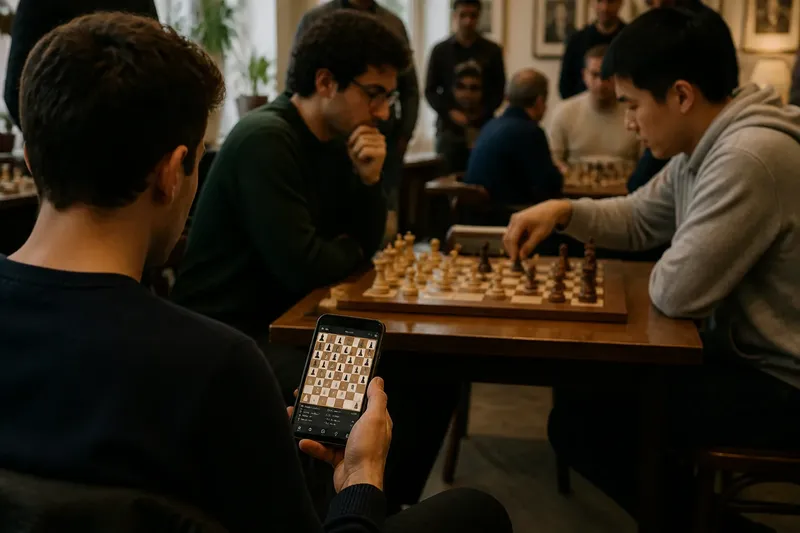
You settle into a chair at a chess club as two players begin a game on a wooden board. From the back of the room, the pieces look small; on your phone, the same game is clear, but every move arrives with a tap. Choosing board or screen for following a chess game depends on what you want to notice and where you are watching.
A physical board gives you a shared, three-dimensional position and the players’ gestures. A screen can make moves, clocks, and changing positions easier to inspect. Neither is automatically the more attentive way to watch. Pick the format that removes the obstacle in front of you.
What do you want to notice first?
If you want to read the position as a whole, a board can help. You can compare the space around the king, see which pieces face one another, and notice a file or diagonal opening without choosing a square to zoom in on. The board’s fixed size also keeps your attention on the game’s physical scale.
If you want to track exactly what changed after each move, a screen often has the advantage. Many digital boards highlight the last move, display notation, and let you replay earlier moves. That support can be especially useful when a move seems quiet and you want to see which piece left a square or what line opened.
There is a tradeoff: highlights and move lists direct your attention, while a physical board leaves more of the interpretation to you. If you already know what you are looking for, that freedom can be welcome. If you are still learning to keep track of a complicated position, a screen’s visual cues may make the game easier to follow.
Which format fits your seat?
Choose a physical board when you can sit close enough to see the pieces and the players’ moves without straining. A low side table, a clear view of both sides, and a seat away from passing traffic make it easier to follow the position. If you are standing behind several rows of spectators, the board may be less legible than its appeal suggests.
Choose a screen when the board is distant, partly blocked, or visible only from an awkward angle. A laptop can keep the full position in view, while a tablet or phone can suit a crowded room where space is limited. A larger display is useful if you want the board and move list visible together; a small screen may force you to switch views.
For an online broadcast, the screen is usually the practical choice because the game may be shown with a digital board, clock, and commentary. If commentary distracts you, hide the chat or mute the audio rather than changing formats. The goal is to keep the position easy to see without adding noise.
Are you watching alone or with other people?
A physical board works well for a small group gathered around one game. Everyone can point to a square, compare ideas, and share the same position without passing a device around. Leave enough room for people to see the board without leaning over the players or interrupting them.
A screen fits solo viewing and groups seated in different places. A shared display can show the same position to everyone, and online viewers can follow along without crowding the table. In a live venue, check that your device’s brightness and audio will not distract players or nearby spectators.
Imagine you are at a café where a friend is playing at a small table and you have a clear seat beside the board. Follow the physical pieces while the game is calm, then check a digital board on your phone if a sequence becomes hard to reconstruct. The expected result is a shared view that preserves the social feel while giving you a way to catch up; keep the phone silent and out of the players’ space.
How can you keep your attention on the game?
A board encourages you to scan the entire position and watch the players’ hands, posture, and timing. Those details can make the game feel immediate, but they do not tell you what a player is thinking. Treat gestures as part of the scene, not as proof of a plan.
A screen makes it easy to pause, replay, or compare positions, though it can also tempt you to check messages or jump between games. Use a full-screen board and close unrelated tabs if you want to stay with one contest. On a physical board, take a quick note of the move number or use a printed scoresheet if you want to remember where you left off.
Do not spend effort arranging an elaborate multi-screen setup just to follow one game. A stable view of the full board, readable pieces, and a clear clock are usually enough. Extra panels help only when you actually use them to understand the position.
What should you check before choosing a format?
- Distance: Can you distinguish the pieces from your seat? If not, use a closer seat or a screen.
- Visibility: Is the board blocked by people, glare, or a poor camera angle? Choose the view with the clearest full position.
- Move tracking: Do you need notation or replay? Prefer a screen that shows a move list, or keep a scoresheet nearby.
- Company: Are you sharing the game in person? A physical board invites discussion; a shared screen serves a dispersed group.
- Distraction: Will notifications or commentary pull you away? Silence the device or choose the board.
- Comfort: Can you watch without craning your neck or holding a device for a long time? Change seats, prop up the screen, or choose the easier view.
These checks are about your viewing situation, not a ranking of the two formats. A good choice is simply the one that lets you follow the position with less effort.
What should you do when the position gets confusing?
Keep the main format you chose, then use the other as a reference if it is available. Look at the board or screen after the move, identify the piece that moved, and compare the squares it left and entered. If you are watching a broadcast, replay just the recent moves instead of jumping far back and losing the current position.
For a physical game, ask a companion to point out the last move after it is complete, or check a digital record if the game is being broadcast. Avoid leaning over the players or touching pieces. The aim is to restore your own view without changing the players’ conditions.
Which format should you choose in these situations?
Is a physical board better for watching in person?
Choose it when you have a clear, comfortable seat and want to experience the shared space around the game. You can scan the whole position and see the moves happen directly, without a device between you and the players.
Is a screen better for a distant or crowded game?
Usually, if the display gives you a clear view of every piece. A digital board can avoid blocked sightlines and may show the move list, though a small or glare-covered screen can create a new visibility problem.
Which should a beginner use to follow moves?
Use whichever format lets you identify each piece and keep track of where it moved. A screen with move highlighting can help you orient yourself; a physical board can help you practise scanning the full position without visual prompts.
Can you switch between board and screen during a game?
Yes, if the second view is available and switching does not distract players or spectators. Keep one view as your main reference, then check the other when you need to recover a move or see a blocked position.
For following a chess game, choose the board when a close seat and shared attention matter most; choose the screen when visibility, replay, or distance matters more. If both are easy to access, start with the view that feels clearest and switch only when it stops helping. You will follow more of the game by protecting a steady view than by chasing every display feature.